
DuoPlus Cloud Phone vs BitBrowser vs Hippo Cloud Phone: How to Choose a Multi-Account Solution
Compare DuoPlus Cloud Phone, BitBrowser, and Hippo Cloud Phone: real Android environments, device isolation, automation, and batch control differences, with selection advice for cross-border e-commerce and social media matrix scenarios.
DuoPlus Cloud Phone vs BitBrowser vs Hippo Cloud Phone: How to Choose a Multi-Account Solution
When a team is simultaneously running a TikTok matrix, Amazon stores, Facebook ad accounts, or Telegram communities, the real question is often not "can we open multiple accounts" but "does each account look like an independent real device." DuoPlus Cloud Phone, BitBrowser, and Hippo Cloud Phone each represent a different approach: real Android cloud phones, anti-detect browsers, and hardware-based cloud phone clusters. This article breaks down the differences among the three based on real usage scenarios to help you determine which type of tool better fits your business.
The Essential Differences Among the Three Types of Tools

DuoPlus Cloud Phone vs BitBrowser vs Hippo Cloud Phone: How to Choose a Multi-Account Solution - The Essential Differences Among the Three Types of Tools.
Before comparing specific features, first understand what each one isolates:
- DuoPlus Cloud Phone: Cloud-hosted real ARM Android devices. Each cloud phone has an independent device fingerprint, simulated GPS location, independent SIM data, and proxy IP. Accounts run in mobile apps and look just like a local phone.
- BitBrowser: An anti-detect browser that simulates more than 20 fingerprint parameters such as WebGL, Canvas, Audio, time zone, and proxy, making each browser profile look like a different user. It mainly solves the isolation problem for desktop web accounts.
- Hippo Cloud Phone: Hardware devices based on a cloud phone cluster platform, integrating dual independent Android 13 cloud phones, equipped with an 8-core CPU, 8GB of RAM, and 128GB of flash storage. A large number of cloud phones can be controlled and operated synchronously through a web browser.
In one sentence: BitBrowser isolates the browser environment, while DuoPlus and Hippo Cloud Phone isolate the entire Android device. If your accounts are mainly operated within mobile apps, browser solutions naturally have shortcomings.
Comparison of Multi-Account Isolation Capabilities
DuoPlus Cloud Phone: A Real Device Environment for Mobile Accounts
DuoPlus's core advantage is that "each account = an independent phone." Each cloud phone has a unique device fingerprint, globally simulated GPS location, dedicated SIM data, and proxy IP. Accounts will not be associated by the platform due to shared hardware parameters. This is especially critical for platforms such as TikTok, Instagram, Tinder, and Zalo that strongly rely on mobile device information.
At the same time, DuoPlus supports unlimited multi-instance use. Users purchase and control cloud phones as needed, and one-click device replacement can instantly refresh all device parameters, making it convenient to rotate accounts quickly.
BitBrowser: Fingerprint Isolation for Desktop Web Accounts
BitBrowser provides 10 permanently free browser profiles, supports all proxy protocols such as HTTP/HTTPS/SOCKS5/SSH, and makes each profile independent by simulating more than 20 fingerprint parameters. It is suitable for operations scenarios mainly based on web backends, such as Amazon, Facebook, and Google Ads, and also provides team collaboration and permission management.
It should be noted that BitBrowser's isolation occurs at the browser layer. If account activity mainly occurs within mobile apps, browser fingerprints cannot cover the device information read by the apps. BitBrowser has also launched BitCloudPhone to supplement mobile capabilities, but that belongs to another product line.
Hippo Cloud Phone: Hardware-Based Cloud Phone Clusters
Hippo Cloud Phone uses real device chips, can install most Android applications, and overseas data centers ensure stable connections. It supports virtual positioning and virtual scene simulation, and provides sub-account management. It is suitable for teams that need long-term idle operation and batch running of Android applications. Its hardware device form (dual independent Android 13 cloud phones) is relatively friendly to users who want "plug and play."
Automation and Batch Operations
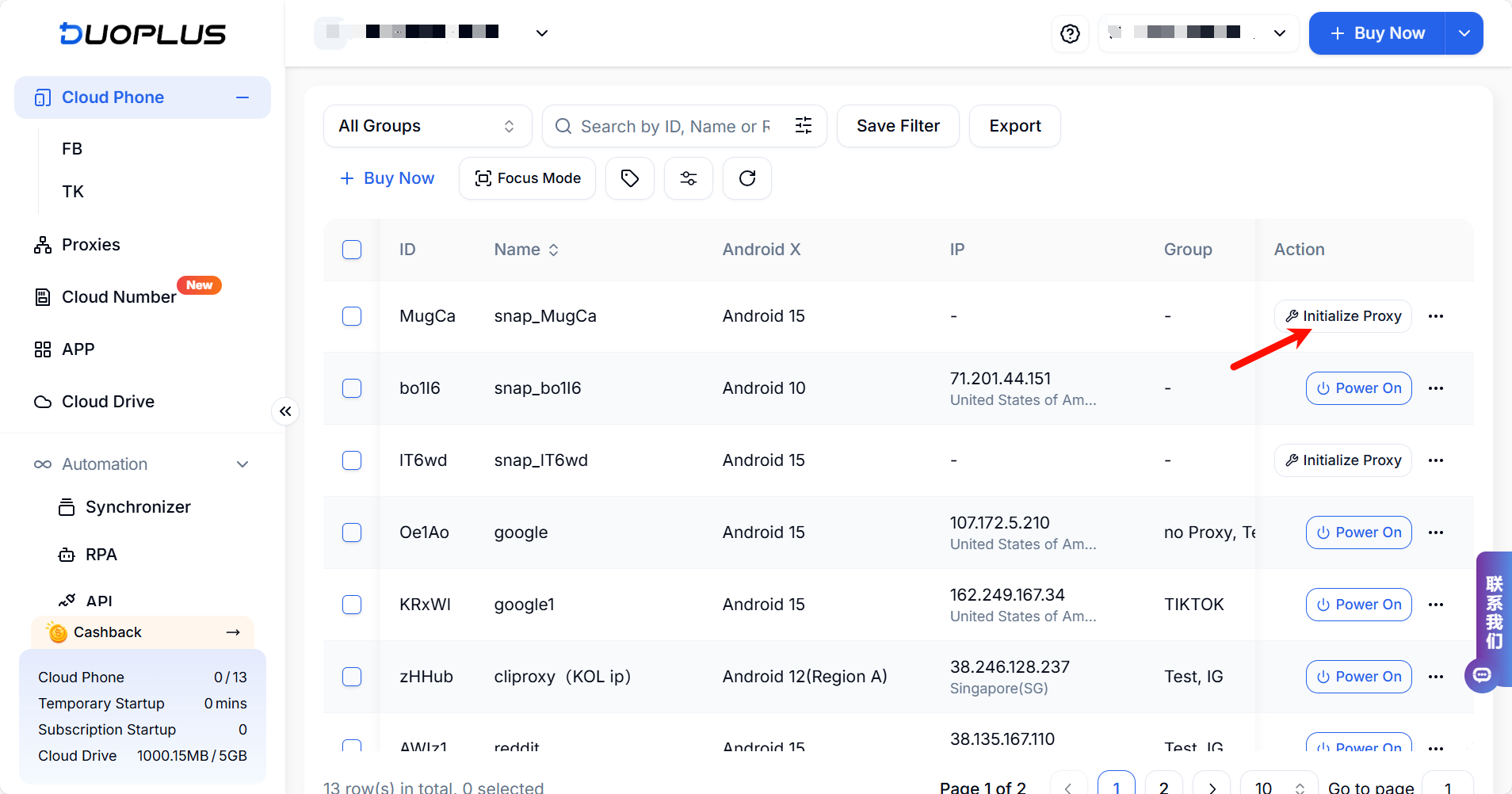
DuoPlus Cloud Phone vs BitBrowser vs Hippo Cloud Phone: How to Choose a Multi-Account Solution - Automation and Batch Operations.
DuoPlus Cloud Phone: AI Agent-Driven No-Code Automation
DuoPlus integrates the DUO+ AI Agent. Users can issue instructions in natural language to automatically complete in-app interactions such as posting, commenting, and following, reducing repetitive manual operations. With the unified control panel, teams can share accounts and control them across platforms and browsers, making it suitable for social media matrix teams that need large-scale content distribution.
BitBrowser: RPA and Script Marketplace
BitBrowser provides RPA automation, an extension and script marketplace, and data synchronization features. It is relatively friendly to operators familiar with automation configuration. Its automation mainly revolves around browser page operations.
Hippo Cloud Phone: Batch Control and Batch Application Management
Hippo Cloud Phone supports batch control operations, batch application installation, batch file uploads, multi-channel real-time streaming, and advanced ADB debugging. It can view screens in real time through a web browser and synchronously operate and manage thousands of cloud phones. For scenarios requiring large-scale synchronous operations, this type of batch control capability is its strength.
Team Collaboration and Centralized Management
DuoPlus Cloud Phone vs BitBrowser vs Hippo Cloud Phone: How to Choose a Multi-Account Solution - Team Collaboration and Centralized Management.
All three products provide some degree of team capability:
- DuoPlus supports team sharing and cross-platform control through a unified control panel, and can be accessed from any browser or device.
- BitBrowser provides team collaboration with permission management, suitable for multiple people sharing browser profiles.
- Hippo Cloud Phone provides sub-account management and centralized web-based control, making it easy to assign operation permissions.
If your team operates both desktop web accounts and mobile app accounts, you can refer to DuoPlus Cloud Phone vs RoxyBrowser vs BitBrowser to learn about the idea of using browsers and cloud phones in combination.
Applicable Scenarios and Selection Advice
| Scenario | More Suitable Direction |
|---|---|
| Multiple accounts for mobile apps such as TikTok matrix, Tinder, and Zalo | DuoPlus Cloud Phone (real Android device environment) |
| Multiple accounts for desktop web backends such as Amazon and Google Ads | BitBrowser (anti-detect browser) |
| Long-term idle operation, batch running of Android applications, batch control synchronous operations | Hippo Cloud Phone (hardware-based cloud phone cluster) |
| Need no-code automation to complete in-app interactions | DuoPlus Cloud Phone (DUO+ AI Agent) |
| Limited budget, first small-scale trial of web accounts | BitBrowser (10 permanently free profiles) |
If you are more concerned about the trade-offs between real Android environments and anti-detect browsers, you can further read DuoPlus Cloud Phone vs Kameleo vs Hippo Cloud Phone; if your focus is the differences between hardware cloud phone clusters and other solutions, DuoPlus Cloud Phone vs Nstbrowser vs Hippo Cloud Phone provides a more detailed comparative perspective.
Frequently Asked Questions
Can DuoPlus Cloud Phone replace BitBrowser?
The problems they solve do not completely overlap. DuoPlus is aimed at account operations within mobile apps and provides a real Android device environment; BitBrowser is aimed at fingerprint isolation for desktop web accounts. If the business involves both web backends and mobile apps, using them in combination is often more reasonable than choosing one over the other.
Is Hippo Cloud Phone suitable for cross-border e-commerce?
It is suitable for teams that need to batch run Android applications, operate idle for long periods, and perform batch control synchronous operations. It uses real device chips and overseas data centers, can install most Android applications, and provides virtual positioning and sub-account management.
Is the free version of BitBrowser enough?
BitBrowser provides 10 permanently free browser profiles, suitable for small-scale trials or initial validation. When the number of accounts grows and more fingerprint configurations and team permissions are needed, it is usually necessary to evaluate an upgrade plan.
What is the most easily associated link in multi-account operations?
Common risk points include duplicate device fingerprints, mismatch between IP and account region, abnormal GPS positioning, and overly mechanical operation behavior. DuoPlus reduces these risks through independent device fingerprints, simulated GPS, dedicated SIM data, and proxy IP, and provides one-click device replacement for account rotation.
How do you decide whether to choose a cloud phone or an anti-detect browser?
First look at the main operation entry point of the account: if the core actions occur within mobile apps, prioritize cloud phones; if they are concentrated in web backends, anti-detect browsers are usually more direct. You can refer to DuoPlus Cloud Phone vs MoreLogin vs Hippo Cloud Phone to learn about the trade-offs of different combinations.
Conclusion
BitBrowser is mature in fingerprint isolation for desktop web accounts and provides a free quota. Hippo Cloud Phone has clear advantages in hardware-based cloud phone clusters and batch control synchronous operations, while DuoPlus Cloud Phone focuses on real ARM Android devices, independent device fingerprints, and AI-driven no-code automation.
The key to choosing is not "which tool is stronger" but "where your accounts run." For matrix operations mainly based on mobile apps, real Android cloud phones are more suitable; for account management mainly based on web backends, anti-detect browsers are more direct; for large-scale idle operation and synchronous batch control, hardware cloud phone clusters are worth considering. Understanding this, combined with team size and automation needs, will help you make a more reliable decision.
Related reading
- DuoPlus Cloud Phone vs Antidetect Cloud vs Hippo Cloud Phone: How to Choose a Multi-Account Tool - Compare the differences among DuoPlus Cloud Phone, Antidetect Cloud, and Hippo Cloud Phone in multi-account management, anti-detect capabilities, automation, and applicable scenarios to help you choose the solution best suited for cross-border e-commerce and social media marketing.
Sources and further reading
- BitCloudPhone vs DuoPlus: Which Multi-Account Mobile Solution Is Right for You? - Compare BitCloudPhone vs DuoPlus in 2026. Discover the best cloud phone for multi-account management, automation, cost efficiency, and social media marketing.
- BitCloudPhone vs DuoPlus (2025): Why BitCloudPhone Is the Better Cloud Mobile Emulator - Discover why BitCloudPhone (by BitBrowser) is the top cloud-based Android emulator in 2025. Compare it to DuoPlus and see why marketers, e-commerce pros, and automation experts prefer BitCloudPhone for multi-account mobile management.
- BitBrowser vs. DuoPlus Cloud Phone Comparison - SourceForge - Compare BitBrowser vs. DuoPlus Cloud Phone using this comparison chart. Compare price, features, and reviews of the software side-by-side to make the best choice for your business.