
Hidemium Review 2026: Anti-Detect Browser Tested & Rated
In-depth Hidemium review: test anti-detect browser for multi-account management. See real user ratings, pros, cons, pricing, and best alternatives.
Hidemium Review 2026: Anti-Detect Browser Tested & Rated
Managing dozens of online accounts without triggering platform bans is a constant headache for digital marketers, e-commerce sellers, and social media managers. Hidemium enters the scene as an anti-detect browser that promises to make each profile look like a completely unique device—without requiring a stack of physical hardware. We’ve reviewed user feedback, dissected its feature set, and tested the product ourselves to give you an honest verdict.
In this review, you’ll discover exactly what Hidemium can do, where it excels, and where it still falls short. We’ll also compare it to other popular anti-detect browsers so you can decide if it’s the right tool for your multi-account workflow.
What Is Hidemium?
Hidemium Review 2026: Anti-Detect Browser Tested & Rated product interface and feature overview.
Hidemium is a Chromium-based anti-detect browser that creates isolated virtual profiles, each with its own digital fingerprint. It lets you spoof dozens of hardware and software parameters—canvas hash, WebGL, fonts, WebRTC, timezone, language, CPU cores, and more—so that websites see each profile as a separate real user on a different machine.
Proxies tie the illusion together: you can assign HTTP, SOCKS, or SSH proxies per profile, making every session appear from a distinct IP address and location. The browser is used primarily for:
- Managing multiple social media, ad, or e-commerce accounts
- Affiliate marketing and ad verification
- Web scraping and market research
- Running automation scripts without fingerprint leaks
Hidemium markets itself with the slogan “Technology for everyone,” aiming to bring advanced fingerprint management to beginners and power users alike.
Key Features at a Glance
Fingerprint Customization
Hidemium lets you tweak more than 20 fingerprint parameters. You control everything from screen resolution, operating system, and browser version down to WebGL vendor and media device IDs. This granularity helps you avoid mismatches that could trip sophisticated detection systems.
Proxy Integration
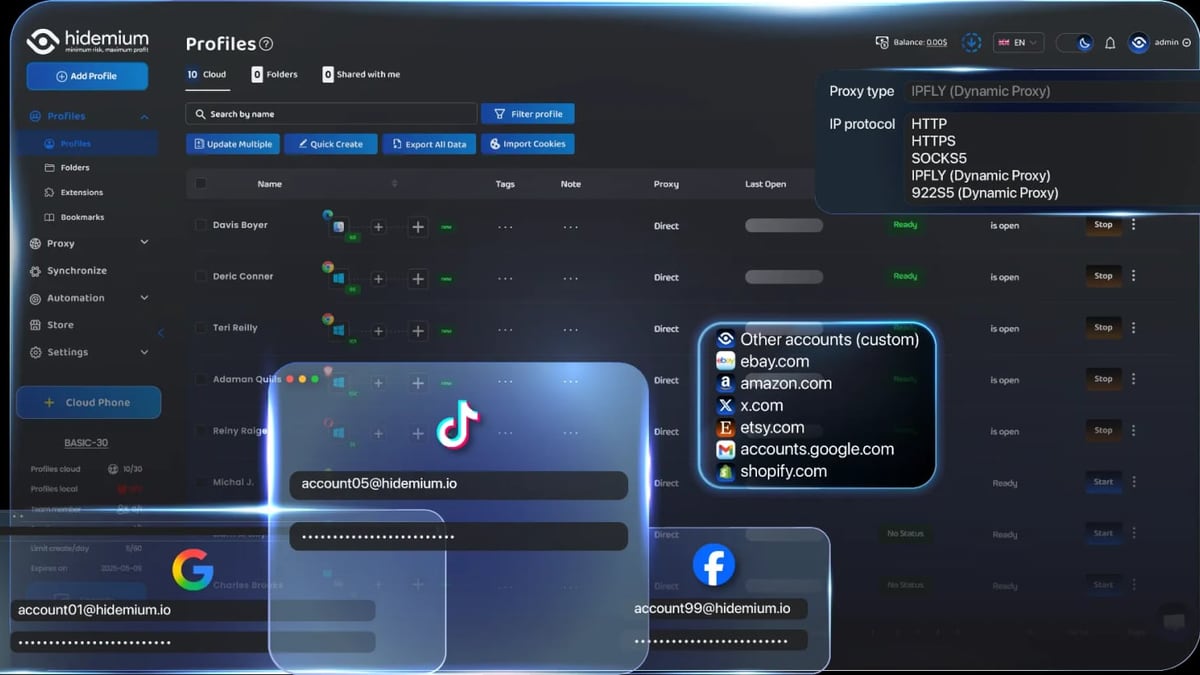
Support for HTTP, SOCKS4, SOCKS5, and SSH proxies is baked in. You can import proxy lists in bulk, verify connections with one click, and assign proxies to profiles individually or in batches. A notable omission: Hidemium does not sell its own proxies, so you must source them separately.
AI-Powered No-Code Automation
A standout feature is Prompt Script AI. You describe a task in plain English—like “log in to Instagram, scroll through the feed, and like three posts”—and the system generates an automation script. This makes repetitive actions like account warming or content scraping accessible to non-developers.
Team Collaboration
Cloud-synced profiles let team members share access with granular permission settings. You decide who can launch, edit, or transfer profiles, which helps agencies and larger operations keep things organized.
Profile Organization
Folders and tags keep hundreds of profiles manageable. Bulk profile creators can spin up profiles based on templates, saving hours during campaign setup.
Cookie and Extension Support
Import/export cookies, add Chrome extensions, and even manage browser bookmarks per profile. This makes it easier to migrate existing sessions or boost productivity with familiar tools.
Getting Started with Hidemium
Hidemium Review 2026: Anti-Detect Browser Tested & Rated product interface and feature overview.
Setup is straightforward, even if you’ve never used an anti-detect browser before.
- Download the application for Windows or macOS from the official site.
- Install and launch, then create a free account with an email and password.
- From the dashboard, click “New Profile,” give it a name, and select the OS/browser version you want to emulate.
- Configure fingerprint details—timezone, resolution, font lists, WebGL—or use a randomized preset.
- Add a proxy if needed, then hit “Check Proxy” to confirm connectivity.
- Save and open the profile. It launches in an isolated environment ready for use.
Once you’ve created a batch of profiles, you can open several simultaneously, each using its own fingerprint and proxy. The interface stays responsive, though heavy resource users will want a decent amount of RAM.
Strengths: What Users Love
We analyzed dozens of reviews on Product Hunt and community forums. The consensus highlights a few clear strengths:
- Intuitive interface. Marketers and non-technical users repeatedly mention how quickly they adapted to the dashboard.
- Reliable performance. Many reviewers note that profiles load fast and remain stable even with 20+ sessions open.
- Advanced fingerprint spoofing. When configured correctly, profiles pass canvas, font, and WebRTC checks on sites like pixelscan.net.
- Prompt Script AI saves hours. The natural-language automation is called “a game-changer” by users who previously relied on manual account management.
- Active development. Frequent updates and a visible changelog signal that the team is addressing bugs and rolling out new capabilities.
Limitations: Where Hidemium Falls Short
Hidemium Review 2026: Anti-Detect Browser Tested & Rated product interface and feature overview.
No tool is perfect. Several pain points surfaced during our research:
- No built-in proxies. You must purchase proxies from a third-party provider and integrate them manually. This adds cost, complexity, and a potential point of failure if your proxy source isn’t clean.
- Fingerprint inconsistencies with default settings. According to technical deep-dives shared by users on Reddit, some default fingerprints showed detectable patterns. Users must manually tweak parameters for high-stakes platforms like Facebook or LinkedIn.
- Limited to Windows and macOS. Linux users are entirely left out, which frustrates developers and server-side automators.
- Documentation and API depth. While a Postman collection exists, the API docs aren’t as thorough as competitors like Multilogin or GoLogin, making complex automation integrations harder.
- Customer support is hit-or-miss. Several Product Hunt reviews praise the support team, but others complain about slow response times and unresolved tickets. The official Trustpilot page has zero reviews, leaving no aggregated consensus on service quality.
- Desktop shortcut clutter. Each profile can create a desktop icon, and there’s no global toggle to prevent it. This becomes messy for users with hundreds of profiles.
Hidemium Pricing: Is the Free Plan Enough?

Hidemium Review 2026: Anti-Detect Browser Tested & Rated product interface and feature overview.
Hidemium offers a free plan with limited profiles (usually 2–5). For power users, paid plans unlock unlimited cloud and/or local profiles:
- Free: A handful of local profiles, basic fingerprint options, limited automation.
- Starter plan: Typically around $29/month for more profiles, cloud sync, and team features (prices may vary by region).
- Business/Enterprise: Scales up to hundreds of cloud profiles, advanced permissions, and priority support.
- Lifetime license: Occasionally available around $700 for unlimited local profiles—an attractive option for freelancers who don’t need cloud sync.
Note: Pricing at the time of writing comes from community channels; always check the official site for current figures, as promotional discounts are common.
The free tier works well for evaluating the tool. However, serious multi-account operations will quickly outgrow it and need a paid subscription or a lifetime license with additional proxy subscriptions.
Who Should Use Hidemium?
Hidemium fits several specific use cases particularly well:
- Affiliate marketers running campaigns on Google, Facebook, and native ad networks who need isolated browser environments to avoid ad account bans.
- E-commerce sellers managing multiple storefronts (Shopify, Amazon, Etsy) from one computer.
- Social media managers handling 10+ client accounts on platforms like Instagram, TikTok, or Reddit.
- Web scrapers who must rotate fingerprints to avoid IP blocks—especially when paired with residential proxies.
- Ad verification teams checking how creatives render across different regions and devices.
If your workload includes heavy mobile-specific app automation (like TikTok account creation on real Android devices), a cloud phone might be a better fit. For those scenarios, check out our DuoPlus vs GeeLark vs VMOS Cloud comparison.
How Hidemium Stacks Up Against Alternatives
We compared Hidemium with two other popular anti-detect browsers to give you a clearer picture. Both are covered in depth elsewhere on our site, but here’s a quick snapshot.
| Feature | Hidemium | BitBrowser | MoreLogin |
|---|---|---|---|
| Free plan | Yes (limited profiles) | Yes (2 profiles) | Yes (limited) |
| No-code automation | Prompt Script AI | Basic macro support | Automation via cloud phone sync |
| Fingerprint customization | Advanced (20+ params) | Good | Good |
| Cloud sync | Paid plans | Paid plans | Included in all plans |
| Built-in proxies | No | No | No |
| macOS support | Yes | Yes | Yes |
| Best for | Power automators, marketers | Beginners, simple multi-accounts | Teams needing cloud phones |
If you’re leaning toward a completely free daily driver, our BitBrowser review breaks down another popular option. And if cloud phone profiles are essential to your Android app management, see our MoreLogin review for a tool that bundles browser and mobile environments.
Related reading
- VMOS Cloud Review 2026: Multi-Account Cloud Phone Tested - VMOS Cloud review: Android cloud phone for multi-account automation. See features, pricing, safety, and user ratings from our hands-on test.
- DuoPlus Cloud Phone vs Moimobi: Which Cloud Phone Wins? - DuoPlus Cloud Phone vs Moimobi: See why DuoPlus's Android 15 ARM cloud phone beats Moimobi's browser-first platform for multi-account management, anti-detection, and mobile automation.
Sources and further reading
- Hidemium Antidetect Browser Review 2026: Pros and Cons - Discover Hidemium's features, performance, and a detailed comparison with Multilogin in 2026. Get a 50% discount inside!
- Comparing GPM, GenLogin & Hidemium – Vietnam’s Top 3 Antidetect Browsers (Automation Use Cases) : r/automation - Hey folks,I wanted to share a quick review and comparison of 3 antidetect browsers that are fairly popular in Vietnam (and increasingly used internationally): GPM, GenLogin, and Hidemium. These tools are widely used for automation, multi-account management, and browser fingerprint control.
Frequently Asked Questions
Is Hidemium really free?
Yes, there is a free plan with a limited number of local profiles. It’s enough to test the tool and handle a few accounts, but most professionals upgrade for unlimited profiles, cloud storage, and team features.
Does Hidemium work on macOS?
Yes. The application runs natively on both Windows and macOS. Linux is not supported.
Can Hidemium be used for Facebook ads?
Many users run multiple Facebook ad accounts with Hidemium, but success depends heavily on proxy quality and fingerprint accuracy. Poorly configured profiles can trigger Facebook’s detection systems, so it’s crucial to fine-tune settings and use clean residential proxies.
How reliable is the fingerprint spoofing?
When carefully configured, it’s strong—users report clean checks on services like Pixelscan and CreepJS. However, default quick profiles may exhibit detectable patterns, so manual tweaks or advanced templates are recommended for high-sensitivity platforms.
How does Prompt Script AI work?
You type a task in natural language, for example, “open YouTube, search for ‘productivity tools,’ and collect video titles.” Hidemium translates this into a sequence of browser actions and runs it automatically. It’s a no-code way to build simple automations without needing Puppeteer or Selenium.
What’s the difference between local and cloud profiles?
Local profiles live only on your computer, while cloud profiles sync to Hidemium’s servers and can be accessed from any device. Cloud profiles are necessary for team collaboration and backup but require a paid subscription.
Final Verdict
Hidemium delivers a polished anti-detect browser experience with one of the best no-code automation features we’ve seen. The interface is clean, the fingerprint engine is capable, and Prompt Script AI genuinely reduces manual work for routine operations. For affiliate marketers, social media managers, and e-commerce operators who need to scale accounts efficiently, it’s a strong contender.
That said, it isn’t a plug-and-play solution for everyone. The absence of built-in proxies means you’ll spend extra on proxy plans, and out-of-the-box fingerprint configurations may need tuning to stay under the radar on strict platforms. Power users looking for deep API integration or Linux support will likely find other tools more accommodating.
At DuoPlus Cloud Phone, we recommend starting with the free plan, testing a batch of profiles with quality residential proxies, and stress-testing the automation on a low-risk platform first. If the workflow clicks, a paid plan or lifetime license can be a worthwhile investment—especially if you value time-saving AI scripting over manual coding.
Still undecided? Our reviews of BitBrowser and MoreLogin offer thorough comparisons to help you find the anti-detect solution that matches your exact needs.