
Moimobi Review 2026: AI Cloud Phone & Browser Tested
Evidence-based Moimobi review: test AI browser, cloud phone, pricing (Free-$49/mo), workflows, pros & cons. See if it’s right for multi-account social media teams.
Moimobi Review: AI-Powered Cloud Phone & Browser Automation for Multi-Account Teams
Managing dozens of social media, ecommerce, or lead-generation accounts often turns into a mess of scattered profiles, proxies, and manual checks. Moimobi promises to fix that by combining isolated AI browsers, cloud phones, and repeatable workflow automation in one desktop app. In this review, we break down exactly how it works, who it serves, and where it falls short—based on hands-on testing and an analysis of its capabilities.
At DuoPlus Cloud Phone, we put platforms like Moimobi through real-world testing to help teams choose the right multi-account automation stack. This review is part of that commitment.
What Is Moimobi?
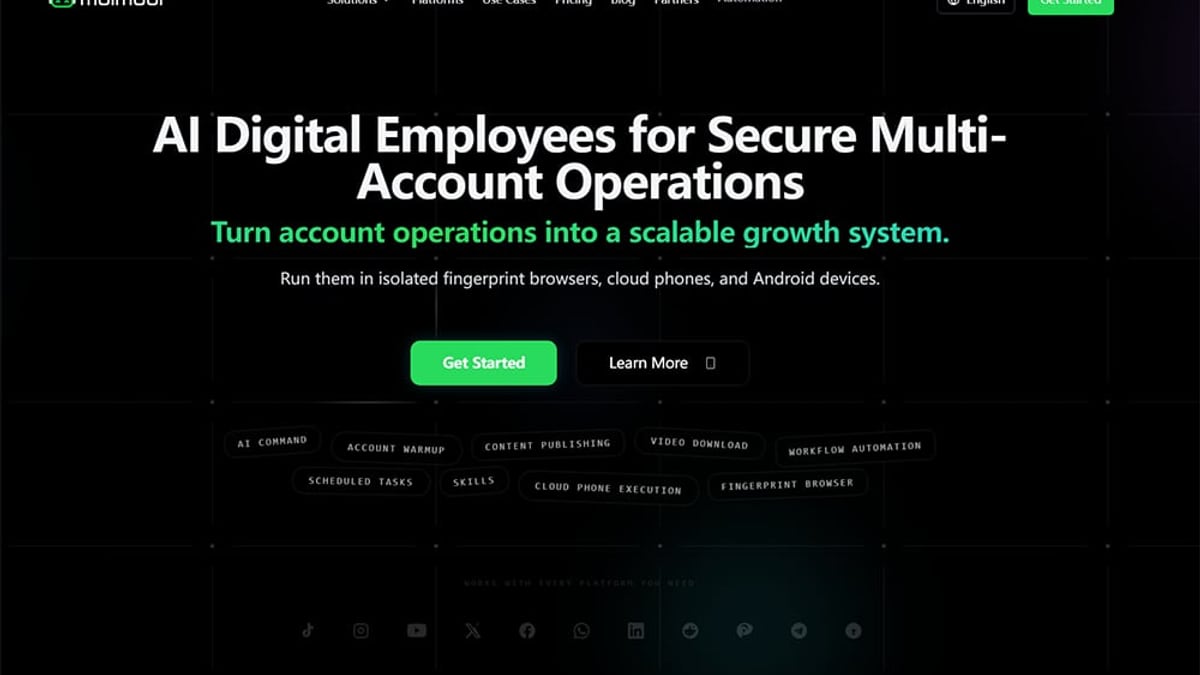
Moimobi Review 2026: AI Cloud Phone & Browser Tested product interface and feature overview.
Moimobi is a desktop application that provides AI-powered browser automation and optional cloud phone environments. It’s built for teams that need to run multiple TikTok, Instagram, X, YouTube, and ecommerce accounts without cross-contamination. Every account lives in its own isolated environment—with a unique browser fingerprint, proxy, session, device profile, and location—so you reduce the risk of bans and correlations.
The platform moves beyond simple profile managers by offering a visual workflow builder. You can chain together tasks like posting, account warm-up, AI-generated comment replies, and scheduled daily operations. Then, you execute those flows across multiple accounts in parallel, with permissioned team access and execution logs.
Key Features Explained
AI Browser Automation
Moimobi’s core runner is an AI browser. Each browser profile stores cookies, local storage, and login state separately. You can create workflows that mimic human browsing: watch videos, scroll feeds, like posts, or publish content. The AI engine can parse on-screen instructions—for example, “read recent comments, draft a friendly reply, and post it”—without you needing to write code. This is where the “AI” part shines most.
Cloud Phone Add-On
When mobile-only app actions are required (e.g., Instagram Reels editing, TikTok Shop management, or certain Android-only behaviors), Moimobi offers Cloud Phone add-ons. These are real Android virtual devices housed in the cloud. You don’t get a physical phone; instead, you launch a cloud phone environment within the app and run workflows there. Note that Cloud Phone is a paid add-on—not included in the base browser automation plans.
Workflow Templates and Customization
A library of ready-made templates covers posting, warm-up, comment replies, and daily operation tasks. You can customize these by adjusting timing, target accounts, and AI behavior. For example, a TikTok warm-up workflow might be configured to browse for 10 minutes, watch three full videos, and leave a generic comment—all spread across 20 accounts with random delays.
Isolation and Team Access
Each account gets its own browser fingerprint, proxy settings, timezone, and language. Onboarding a new team member doesn’t mean sharing passwords or risking session overlaps; admins assign specific accounts and workflows, and the system keeps environments walled off. Execution logs and review gates let managers see exactly what ran and whether it succeeded, creating an audit trail across operators.
How Moimobi Works: From Setup to Execution
Getting started follows a straightforward path:
- Download and install the desktop app (Windows/macOS).
- Create an account environment by assigning a browser profile or a cloud phone, setting a proxy, and choosing a location.
- Choose a workflow template (e.g., “Multi-Account Posting”) or build your own with the visual editor.
- Select the accounts and environments to run the workflow.
- Run once or schedule daily. Logs capture each step, so you can troubleshoot failed runs.
Advanced users can chain tasks into daily sequences: warm up five accounts in the morning, post two videos at noon, and reply to comments in the evening—all without manual intervention.
Moimobi Pricing: Free, Starter, Basic, Professional
Moimobi uses a hybrid pricing model that counts browser environments, automation accounts, parallel execution slots, and learning points (credits consumed per task launch). Here’s the breakdown at a glance:
| Plan | Price (Monthly) | Browser Environments | Automation Accounts | Parallel Runs | Learning Points | Key Limit |
|---|---|---|---|---|---|---|
| Free | $0 | 10 | – | 1 | 500 | No scheduling, no account groups |
| Starter | $5 | 20 | – | 2 | 2,000 | 1 user, no advanced scheduling |
| Basic (Recommended) | $15 | Unlimited | 50 | 10 | 10,000 | Basic scheduling, 1 user |
| Professional | $49 | Unlimited | 200 | 30 | 50,000 | Advanced scheduling, 5 team members, roles, priority support |
- Learning points: Each workflow run consumes 2 points. That means the Free tier can run about 250 tasks per month, while Professional handles 25,000.
- Cloud Phone add-on: Not included in these prices; you’ll need to contact sales for mobile matrix pricing.
- Free tier limits: No scheduled tasks, no account group management, and no team collaboration. It’s a trial, not a long-term production plan.
For teams ready to commit, the Basic plan at $15/month offers the sweet spot—unlimited browser environments and enough points for daily operations across 50 accounts.
Who Should Use Moimobi?
Moimobi is most valuable for:
- Social growth teams: Agencies managing client accounts across TikTok, Instagram, X, and YouTube who need daily posting, warm-up, and comment engagement at scale.
- Cross-border ecommerce operators: Teams running multiple regional storefronts or influencer accounts that must stay in separate local environments.
- Lead generation farms: Marketers sending outreach through social DMs or content marketing, where each identity needs a clean fingerprint.
- Operators who crave structure: If your current process involves multiple browser profiles, phone farms, or manual switching, Moimobi replaces that with one organized workspace, execution lanes, and team permissions.
Strengths and Limitations
Strengths
- True isolation out of the box: Every account gets its own browser fingerprint, proxy, and cloud phone configuration. The risk of correlation is low compared to anti-detect browsers that share a base installation.
- AI-driven workflows without coding: Using simple natural language instructions, you can automate complex actions like “reply to comments with feedback questions.”
- Execution audit and review: Logs show every step, and the review-gates feature prevents a single operator from running amok.
- Parallel execution: The Basic plan already supports up to 10 simultaneous workflows, which speeds up large campaigns.
- Scalable team management: Assign accounts to specific team members, track who did what, and keep environments separate.
Limitations
- Cloud phone as a premium add-on: If your use case is 100% mobile-app dependent (e.g., TikTok Shop), the base browser plans won’t cut it, and mobile matrix pricing remains opaque.
- Learning curve with points and parallelism: The learning-points consumption model can be confusing for new users. You’ll need to monitor usage to avoid hitting caps mid-campaign.
- Limited platform integrations: Moimobi doesn’t currently plug into third-party data tools, CRMs, or analytics platforms natively. You’ll be exporting logs manually for reporting.
- Free tier too restrictive: Without scheduling or account groups, it’s mainly for testing a single workflow; serious evaluation requires at least the Starter plan.
- Windows/macOS only: No Linux support yet, which may be a deal-breaker for some server-based automation setups.
Moimobi vs. Competitors: A Quick Comparison
If Moimobi feels like a fit, you should also evaluate these alternatives:
- DuoPlus Cloud Phone: A true Android cloud phone service that offers real devices with AI agent capabilities. Unlike Moimobi, DuoPlus leans heavily on mobile-first automation and anti-detection at the phone level. For an in-depth side-by-side, read our DuoPlus Cloud Phone vs Moimobi vs VMOS Cloud: 2026 Comparison.
- MoreLogin: An anti-detect browser and cloud phone combo that focuses more on profile management and less on AI workflow automation. We tested it in our MoreLogin Review 2026: Anti-Detect Browser & Cloud Phone Tested.
- Antidetect Cloud: A cloud-based anti-detect browser with VPN and profile management. It’s lighter on automation but can work well for manual multi-accounting. See our Antidetect Cloud Review 2026 for details.
For teams that want a central orchestration layer—merging browser and phone automation with AI instructions—Moimobi carves a distinct niche.
Related reading
- DuoPlus Cloud Phone vs VMOS: Which Multi-Account Tool Wins? - Compare DuoPlus Cloud Phone and VMOS for multi-account management. See why DuoPlus’s real Android 15 cloud phone with AI agent beats VMOS’s virtualization.
- How to Use DuoPlus Cloud Phone with Apify (Step-by-Step) - Learn how to pair DuoPlus Cloud Phone’s anti-detect Android environments with Apify’s scrapers to automate multi-account management, social media data extraction, and bulk actions without bans.
Sources and further reading
- Cloud Phone & AI Browsers farm for Multi-Account Social Media Automation | Moimobi - Run social media accounts with AI browsers and cloud phones. Automate posting, warm-up, comments, engagement, and multi-account workflows in isolated account environments.
- Free Online Tools | Video Downloader, Social Media Tools - MoiMobi - Free online tools for video downloading, social media content collection, account workflow review, and cloud phone operations.
- Top 10 Moimobi Alternatives & Competitors in 2026 - Top 10 Moimobi Alternatives & Competitors in 2026G2https://www.g2.com › Emerging AI Software › MoimobiG2https://www.g2.com › Emerging AI Software › MoimobiThe best Moimobi alternatives are Miro, Creately, and Alteryx. Find top-ranking free & paid apps similar to Moimobi for your Emerging AI Software
Frequently Asked Questions
Is Moimobi free to use?
Moimobi offers a Free tier with 10 browser environments and 500 learning points per month, but no scheduling or team features. For sustained multi-account operations, you’ll need a paid plan starting at $5/month.
Can I automate TikTok actions like posting and warming up?
Yes. Moimobi provides workflow templates specifically for TikTok warm-up (browsing, watching, light engagement) and multi-account posting. You can use AI browser automation for web actions or Cloud Phone for app-specific workflows.
Does Moimobi support team collaboration?
Only on higher tiers. The Professional plan ($49/month) includes up to 5 team members, role-based permissions, and task assignment. Starter and Basic plans are limited to a single user.
How does Moimobi differ from an anti-detect browser alone?
Anti-detect browsers like MoreLogin or Antidetect Cloud primarily manage profiles and fingerprints. Moimobi adds a workflow automation layer—you can build, schedule, and run multi-step tasks across accounts using AI instructions, which goes far beyond simple profile switching.
What is a “learning point” in Moimobi?
A learning point is a credit consumed each time you launch a task. Most workflows use 2 points per execution. Plans limit how many points you get each month, so you need to estimate usage based on your daily task volume.
Can I use Moimobi for mobile-only apps like Instagram or TikTok Shop?
Yes, but you must purchase the Cloud Phone add-on. The AI browser alone can handle web versions of these platforms, but for full app functionality, cloud phones are required.
Final Verdict: Is Moimobi Worth It?
Moimobi succeeds in giving multi-account teams a structured, AI-powered workspace. The combination of isolated environments, visual workflows, and team execution lanes addresses a real pain point: reducing manual chaos and account bans. For social media agencies and ecommerce operators running 10–200 accounts, the Basic plan at $15/month offers solid value.
However, if your work is exclusively on mobile apps or you need deep integrations with external tools, you’ll likely face additional costs and limitations. The Cloud Phone add-on pricing remains a black box, and the learning-point system demands careful planning.
Start with the Free tier to test the workflow builder and browser isolation. If the execution logs and repeatable scheduling click with your team’s workflow, upgrade to Basic and add Cloud Phone only when you genuinely need app-level automation. For teams already deep into phone farming or manual multi-profile browsers, Moimobi can replace several tools at once—and, according to the platform’s own metrics, boost operational efficiency by over 24%.