
Antidetect Cloud Review 2026: Is It the Right Anti-Detect Browser?
Read our in-depth Antidetect Cloud review covering cloud profiles, VPN, pricing ($25–$180/mo), setup, pros/cons, and comparisons. Ideal for multi-accounting.

Antidetect Cloud Review 2026: Is It the Right Anti-Detect Browser?
Every marketer managing hundreds of social accounts, affiliate campaigns, or e‑commerce stores knows the pain of a sudden platform ban. Fingerprints, IP mismatches, and cookie leaks are silent killers for multi‑account workflows. Antidetect Cloud promises a different approach: an anti‑detect browser that marries local speed with cloud profile storage, where every identity lives in a securely isolated container and stays synchronized across machines. In this review we peel back every layer — what the tool actually does, who it’s built for, how it performs in real‑world tasks, and whether the pricing delivers genuine value or just another monthly subscription.
What Is Antidetect Cloud?

Antidetect Cloud Review 2026: Is It the Right Anti-Detect Browser? product interface and feature overview.
Antidetect Cloud is not another reskinned Chromium fork. It’s a professional anti‑detect browser engineered to create, store, and run multiple digital personas with near‑perfect separation. The two pillars are local browser profiles that you run on your desktop, and cloud‑based profiles that live on the company’s infrastructure — both share the same fingerprint‑spoofing engine. This hybrid model means you can launch a profile from any device without carrying around portable folders, and your session state is always intact. The platform bundles a built‑in VPN, an Android browser environment for mobile‑only platforms, and simple automation tools that let you warm up accounts and repeat actions across profiles.
Unlike many competitors that see cloud profiles as an add‑on, Antidetect Cloud treats cloud as a first‑class citizen. When you open a cloud profile, you’re not just getting a remote browser tab — you get a fully configured environment with its own canvas hash, WebGL renderer, fonts, and geolocation, all matched to the proxy you assign. That combination addresses a core complaint raised by experienced automators: profiles that break when you switch workstations are a nightmare, and cloud residency sidesteps the problem entirely.
Who Is Antidetect Cloud For?
Antidetect Cloud Review 2026: Is It the Right Anti-Detect Browser? product interface and feature overview.
If your workday involves logging into the same platform with more than one identity, you’re likely a candidate. The most common user profiles include:
- Traffic arbitrage specialists who run Facebook Ads, Google Ads, or TikTok campaigns from dozens of separate advertiser accounts. Fingerprint consistency across multiple ad accounts is non‑negotiable.
- E‑commerce operators managing Amazon, eBay, or Etsy seller accounts — especially when scaling a private label across regions.
- Affiliate marketers who need clean, isolated profiles for each offer or platform to prevent data cross‑contamination and tracking.
- Social media managers and agencies juggling client accounts on Instagram, LinkedIn, or YouTube while keeping every client’s activity strictly separate.
- Crypto and airdrop hunters who must complete tasks with multiple wallets and avoid being flagged as one entity.
The common thread is the need for per‑profile hardware‑level uniqueness without the overhead of physical devices. Antidetect Cloud aims to serve exactly that niche between cumbersome virtual machines and lightweight cookie‑only browsers.
Key Features
Cloud Profiles That Sync Across Machines
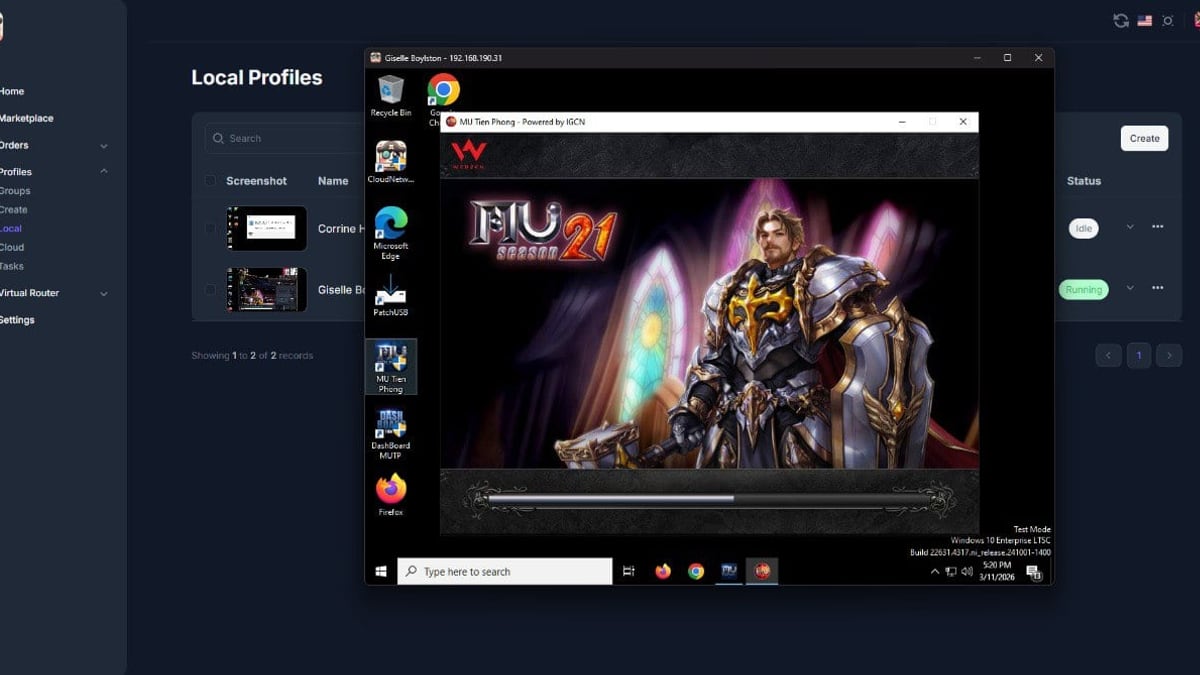
The headline feature is cloud profile storage. Instead of saving a profile file to your local drive, you store the entire browser fingerprint, cookies, local storage, and extension data on Antidetect Cloud’s servers. Launch the same profile from a Windows laptop in the morning and a Mac Mini in the evening — everything is instantly there. For teams, this eliminates “profile handoff” friction and reduces the risk of a team member contaminating a profile by opening it in a mismatched environment.
Deep Fingerprint Spoofing, Not Just Masking
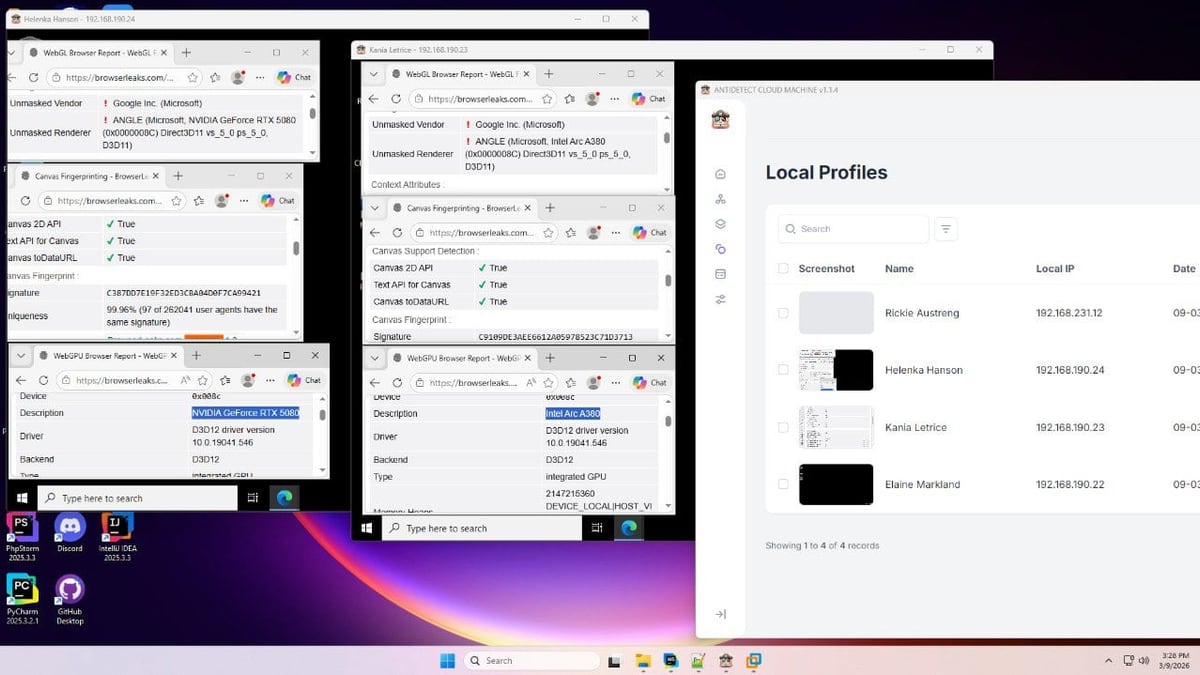
Antidetect Cloud manipulates more than 50 fingerprint parameters: canvas noise, WebGL vendor/renderer, installed fonts, screen resolution, audio context, hardware concurrency, and navigator properties. When you pair a profile with a proxy, the browser can auto‑adjust timezone, language, and geolocation to match. In testing, popular fingerprint scanners return unique and consistent results, which is what keeps platforms from linking accounts together. The cloud profiles use the same engine, so the spoofing depth doesn’t degrade just because a profile lives on a remote server.
Integrated VPN and Proxy Compatibility
You can leave external proxy providers behind for simple tasks. A built‑in VPN service gives each profile a rotating residential IP from a country you select, with the optional Smart IP feature that automatically aligns timezone, language, and GPS to the IP. For advanced users, the proxy manager supports HTTP, HTTPS, SOCKS5, and SSH proxies with easy bulk import. The ability to test proxy speed and geolocation within the dashboard saves time when you’re setting up 50 profiles.
Automation Workflows and Android Browser Profiles
The platform includes an RPA‑style automation builder — you can record actions like cookie importing, login sequences, or ad campaign checks and replay them across multiple profiles. More importantly, Antidetect Cloud supports Android browser profiles. These aren’t full cloud phones; they are mobile‑optimized browser fingerprints that mimic Chrome on Android. This is essential for platforms that enforce mobile‑first authentication flows or throttle desktop user‑agents. While not a cloud phone replacement, the Android profiles close a gap that desktop‑only anti‑detect browsers leave wide open.
Team Collaboration Under One Roof
You can invite team members, set role‑based permissions, and share profile groups. An activity log shows who opened which profile and when. For agencies, the permission system means a junior media buyer can use assigned ad‑account profiles without seeing sensitive billing details or being able to export cookies.
Setting Up Antidetect Cloud — A Quick Walkthrough
Antidetect Cloud Review 2026: Is It the Right Anti-Detect Browser? product interface and feature overview.
Starting with Antidetect Cloud follows a clean, guided flow:
- Create your workspace — download the desktop app (Windows/macOS) and log in. The same account syncs with the web dashboard.
- Add proxies — in the Proxy tab, paste your IPs or choose the built‑in VPN locations. Test each proxy to confirm it shows the expected country.
- Build your first profile — pick Local or Cloud storage, assign a proxy, choose the operating system (Windows, macOS, Android) and a random fingerprint preset. You can also start from a cookie file.
- Launch and verify — open the profile, run a fingerprint check, log into your target platform and let the session stabilize. Cloud profiles take a few seconds longer to spin up but run smoothly once active.
- Scale with batch creation — paid plans unlock batch profile creation where you can generate dozens of profiles at once, each with its own fingerprint and IP pairing.
Tip: For mobile‑first accounts like TikTok or Instagram, pair the Android browser profile with a dedicated mobile proxy to increase trust scores. And for accounts that also require a phone number for verification, using a non‑VoIP SMS service becomes critical — you can find reliable options in DuoPlus Cloud Phone’ ranking of the best SMS verification services.
Pricing Plans at a Glance
Antidetect Cloud offers straightforward, flat‑rate subscriptions that don’t charge by the minute or by individual cloud sessions — a distinct advantage over some cloud phone services where runtime costs accumulate unpredictably (see how minute‑based pricing can spiral in practice). As of 2026, the main tiers are:
| Plan | Profiles | Cloud Profiles | Team Seats | Monthly Price |
|---|---|---|---|---|
| Solo | 100 | 10 | 1 | $25 |
| Professional | 500 | 50 | 3 | $85 |
| Business | 2,000 | 200 | 10 | $180 |
All paid plans include the built‑in VPN, Android profiles, and automation tools. A lifetime license is also available for users who prefer a one‑time payment — an uncommon option in the anti‑detect space worth considering if you plan to stay for years. A free trial with 5 profiles gives you enough room to run fingerprint tests and assess real‑world behavior before committing.
Strengths: What We Liked
- Cloud profiles done right — they feel as responsive as local ones after the first launch, and cross‑machine sync is seamless.
- All‑in‑one VPN removes the need for a separate proxy subscription in many straightforward use cases, especially for warmup and research tasks.
- Fingerprint diversity is excellent. The browser spoofs audio, canvas, WebGL, and font stacks in a way that passes common checks like IPhey and PixelScan consistently.
- Android browser profiles bridge the desktop‑mobile gap without forcing you to buy cloud phones for every mobile session.
- Batch creation and macro recording cut down hours of manual setup, particularly useful for media buyers onboarding new Facebook ad accounts.
- The support channels (Telegram, Facebook) are responsive, and the “Customer is God” policy isn’t just marketing — our test questions were answered within minutes during business hours.
Limitations: Where Antidetect Cloud Falls Short
Antidetect Cloud Review 2026: Is It the Right Anti-Detect Browser? product interface and feature overview.
No tool is perfect, and honest adoption decisions require acknowledging the rough edges:
- Android profiles are browsers, not full devices. Platforms that require native mobile apps with genuine ARM hardware signals (IMSI, serial numbers, hardware keystores) may still detect the emulated environment. For wholly native mobile app multi‑accounting, a real ARM‑based cloud phone remains safer — a comparison we detailed in our DuoPlus Cloud Phone vs Kameleo analysis.
- Cloud profile startup time can be 10–15 seconds on the first launch of the day, which may irritate operators who need to rotate through 20 profiles in quick succession.
- The built‑in VPN is not a dedicated residential proxy network. While convenient, its IP reputation can vary, and heavy automation on sensitive platforms may require your own high‑quality mobile proxies.
- No native mobile app for on‑the‑go profile management. Profile creation and team management require a desktop or web dashboard; a companion app isn’t available yet.
- Limited third‑party integrations — unlike some rivals, Antidetect Cloud currently lacks pre‑built connectors for platforms like Make.com or Zapier, pushing users to rely on the built‑in automation recorder.
How Does Antidetect Cloud Compare to Alternatives?
Choosing between anti‑detect tools means matching your workload to the right architecture. Here’s a quick decision matrix:
- Antidetect Cloud vs. Traditional Browsers (Multilogin, GoLogin): The main advantage is the tight cloud integration. Competitors offer cloud profiles as an optional add‑on; Antidetect Cloud made it a foundation feature. If you frequently switch devices or work with remote teams, this alone can justify the switch. For pure local work with high‑end proxy customizations, the feature sets are comparable.
- Antidetect Cloud vs. Cloud Phones (DuoPlus, GeeLark): This is the most important fork in the road. Cloud phones give you a full Android device with real IMEI numbers and hardware‑level fingerprinting — indispensable for mobile apps like TikTok, WhatsApp, or Vinted where the app scans the entire system. Antidetect Cloud’s Android browser profiles are lighter, cheaper, and fine for mobile‑web flows, but they can’t fully emulate a genuine phone. If your business runs on mobile apps, read our hands‑on DuoPlus Cloud Phone vs BrowserJet vs Kameleo comparison to see where cloud phones shine.
- Antidetect Cloud vs. Generic Browsers with Extensions: Free setups using portable Firefox or Chromium can’t match the fingerprint randomization depth, nor do they offer team management. They work for trivial tests but collapse under 50‑profile management.
Related reading
- Top 10 AI Video & Photo Editing Software 2026 (Tested) - Discover the best AI-powered video and photo editing software of 2026. We rank 10 tools based on AI features, ease of use, and output quality.
Sources and further reading
- Best 7 Antidetect Cloud Phone Tools for Multi-account in 2026: Detailed Guide - We compare and list 7 best android cloud phone tools in 2026 and share their honest review, performance so you can pick the best one. VMOS Cloud, GeeLark, MultiLogin, DuoPlus, BitCloudPhone, MoreLogin, and UgPhone included.
Frequently Asked Questions
Is Antidetect Cloud suitable for managing TikTok accounts?
If your TikTok activity happens through the mobile website, Android browser profiles can work. However, for content creation, live streaming, or any in‑app action that triggers device attestation, a true ARM cloud phone is strongly preferred. Pairing a cloud phone with a dedicated SMS number — as shown in DuoPlus Cloud Phone’ guide to using DuoPlus with SMSPool — yields a far stronger setup.
Does the built‑in VPN slow down browsing?
Speed depends on the selected endpoint. In testing, European and North American servers delivered 20‑40 Mbps — sufficient for ad dashboard management, social media scrolling, and form submission. For heavy image or video uploading, external residential proxies from specialized providers will feel snappier.
Can I import cookies and sessions from another browser?
Yes. The profile creation wizard accepts cookie files in Netscape and JSON formats. Session state extends across launches, so you won’t have to re‑login each time.
How does subscription cancellation affect my cloud profiles?
Cloud profiles are frozen, not deleted immediately. You retain access to local profiles and can export cookies before the grace period ends. The company advises backing up important sessions regularly.
Final Verdict: Should You Use Antidetect Cloud?
Antidetect Cloud earns its place as a thoughtfully built anti‑detect browser for the 2026 multi‑account landscape. It recognizes that modern workflows rarely happen from a single machine and builds synchronicity into the core — not as a premium bolt‑on. The flat‑rate pricing with unlimited runtime on cloud profiles eliminates the anxiety of pay‑as‑you‑go minute models that plague some cloud phone services, as reported by Gologin. Fingerprint depth, Android browser support, and a usable automation module make it a strong all‑rounder for affiliate, e‑commerce, and arbitrage professionals.
If your identity workload lives primarily in web browsers and you value mobility and team management over raw hardware emulation, Antidetect Cloud is a solid investment. For operations that hinge on native mobile app environments, treat it as a companion tool rather than a replacement, and supplement with a genuine ARM cloud phone where apps require it. In a market full of feature‑matched clones, the cloud‑first philosophy here is a genuine differentiator — and one that will save you countless hours of profile juggling and accidental bans.