
DuoPlus Cloud Phone vs BrowserJet vs RoxyBrowser
Compare DuoPlus Cloud Phone, BrowserJet, and RoxyBrowser for multi-account management. See which tool fits real Android cloud phones, anti-detect browsers, or proxy-based tab isolation.
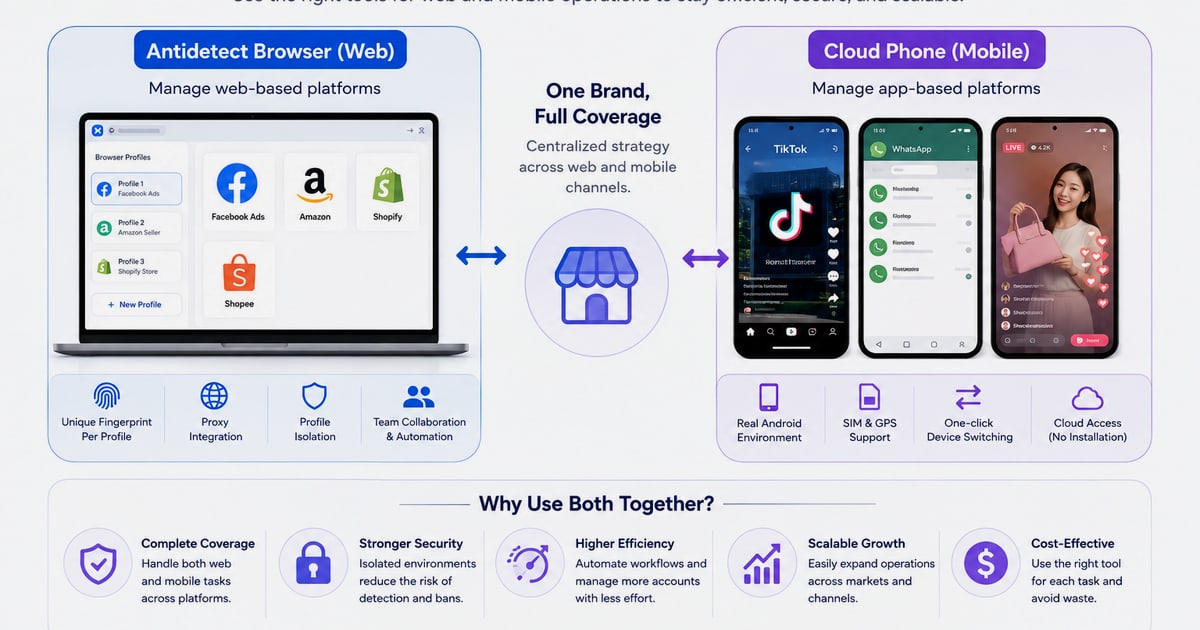
DuoPlus Cloud Phone vs BrowserJet vs RoxyBrowser: Which Multi-Account Tool Fits Your Workflow?
Managing multiple online accounts without triggering platform bans requires more than just switching tabs. Marketers, agencies, and e-commerce operators now choose between two distinct technologies: cloud-based Android phones that replicate real mobile hardware, and anti-detect browsers that isolate web sessions. DuoPlus Cloud Phone, BrowserJet, and RoxyBrowser each represent a different approach to this challenge. This comparison breaks down their architectures, strengths, and ideal use cases so you can match the tool to your actual workflow.
Architecture Matters: Real Android Devices vs. Isolated Browser Sessions

Banner.
Before diving into features, it’s critical to understand the foundational difference between these products.
DuoPlus Cloud Phone is not a browser. It is a cloud-hosted, ARM-based Android 15 virtual device. Each instance runs a complete mobile operating system with its own IMEI, SIM data, GPS location, and device fingerprint. When you log into TikTok, Instagram, or WhatsApp through DuoPlus, the platform sees a real Android phone connecting over a mobile proxy. This hardware-level realism is essential for app-centric platforms that heavily scrutinize device integrity.
BrowserJet and RoxyBrowser are anti-detect browsers. They run on your desktop and create isolated browser profiles that spoof or randomize web fingerprints—things like canvas hashes, WebGL renderers, user agents, and cookie jars. They excel at managing web-based accounts but do not provide a mobile operating system. If you need to run the Instagram app, you cannot do it inside BrowserJet or RoxyBrowser.
This distinction shapes every comparison that follows.
BrowserJet: Per-Tab Proxy Isolation for Power Users

Logo.
BrowserJet positions itself as a specialized proxy browser, not a generic anti-detect tool. Its standout feature is per-tab IP assignment. Each tab operates as an independent session with its own proxy, cookie jar, and storage. This means you can log into ten different Gmail accounts in ten tabs of the same window, and Google sees ten unique users from different locations.
Where BrowserJet Excels
- Granular Session Control: The one-click IP reload per tab lets you instantly refresh a session’s network identity without touching other tabs. This is invaluable for tasks like sneaker copping, ticket purchasing, or ad verification where timing and fresh IPs matter.
- Built-in Proxy and VPN Integration: BrowserJet bundles its own proxy infrastructure. You don’t need to source third-party proxies for basic use, which simplifies setup for users who find proxy management cumbersome.
- Credential Management: The built-in accounts manager stores and auto-fills credentials per profile, reducing manual entry errors across dozens of accounts.
- Mobile View Emulation: While not a real mobile OS, the browser can emulate mobile viewports and user agents for quick visual checks of mobile web pages.
Practical Use Cases
A crypto trader managing multiple exchange accounts from one desktop can assign a dedicated, geo-specific IP to each tab and switch between them seamlessly. A market researcher can scrape competitor pricing from different regions without triggering rate limits, simply by reloading a tab’s IP.
BrowserJet’s pricing starts at $89/month for the Captain Basic plan and $149/month for Captain Pro, with optional premium proxy add-ons. This places it in the professional tier, suitable for users whose primary battlefield is the web browser.
RoxyBrowser: Fingerprint Isolation with Automation Depth
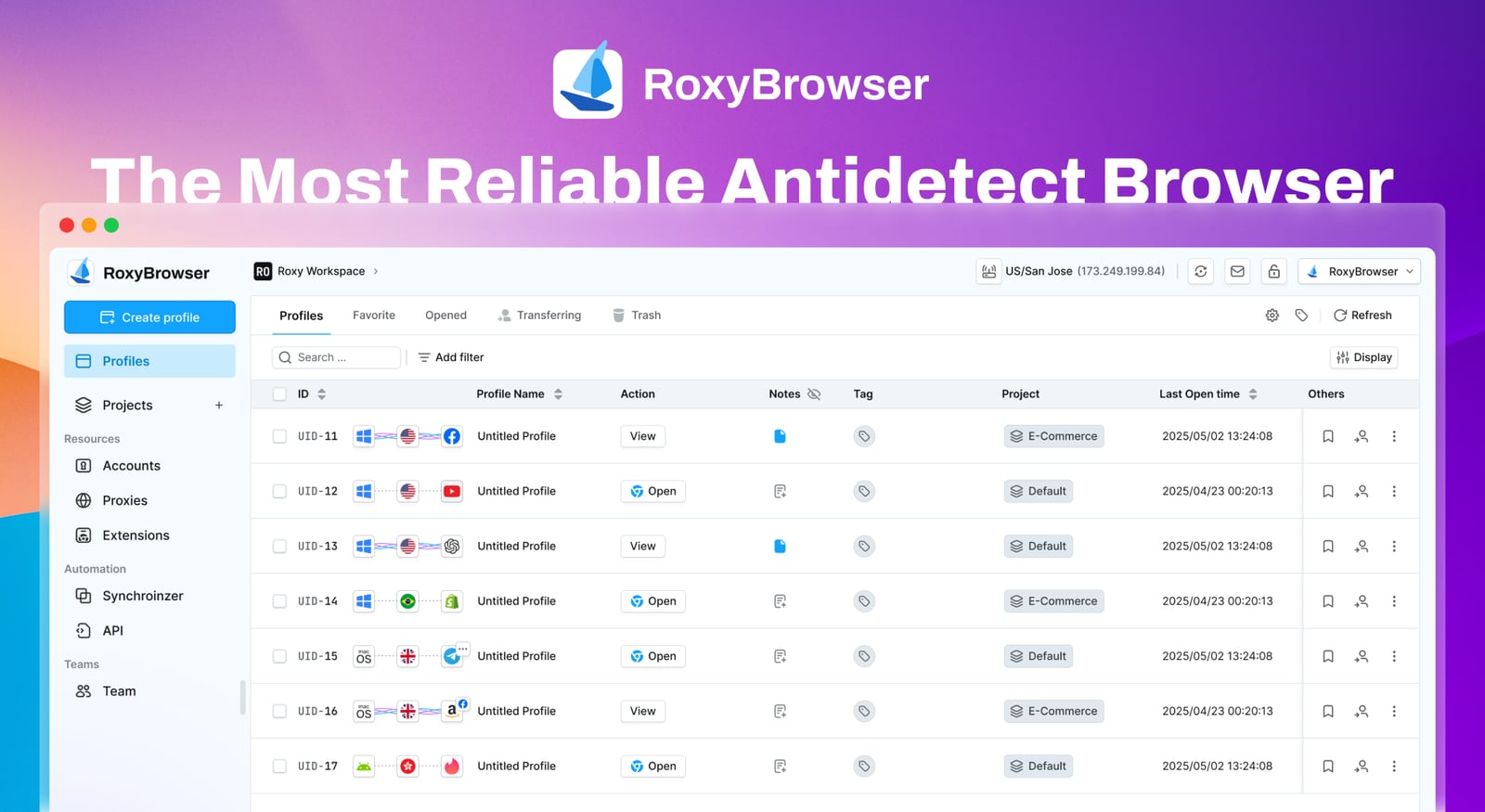
RoxyBrowser product interface.
RoxyBrowser takes a more traditional anti-detect browser approach but layers on deep proxy integration and automation support. It creates unique browser profiles, each with isolated fingerprints, and seamlessly integrates with the RoxyIP proxy network. This tight coupling means you can assign residential or mobile proxies to profiles without juggling external providers.
Where RoxyBrowser Excels
- Advanced Fingerprint Isolation: RoxyBrowser goes beyond basic user-agent spoofing. It actively masks canvas, WebGL, audio, and font fingerprints to create profiles that pass sophisticated browser fingerprinting checks.
- Automation-Ready: Native support for Puppeteer, Selenium, and Playwright means you can script complex web interactions across hundreds of profiles. For teams running SEO audits, ad verification, or affiliate campaign testing, this is a core requirement.
- Team Workspaces: RoxyBrowser includes collaboration features that let teams share profiles, assign permissions, and manage workflows without exposing sensitive credentials.
- Flexible Pricing with Free Tier: A 7-day free trial and scalable plans from free to enterprise make it accessible for solo operators testing the waters and large agencies alike.
Practical Use Cases
An SEO agency can run rank-tracking scripts from hundreds of localized profiles, each appearing as a real user in a specific city. An affiliate marketer can manage Facebook Ads accounts for clients in different countries, with each profile using a RoxyIP residential proxy that matches the target geo.
RoxyBrowser runs on Windows and macOS. It is a pure web-profile solution—there is no mobile app environment. For web-heavy workflows that demand automation, it’s a strong contender.
DuoPlus Cloud Phone: The Mobile-First, Hardware-Level Alternative
For operations that depend on mobile apps, DuoPlus Cloud Phone addresses a gap that no desktop browser can fill. Platforms like TikTok and Instagram assign higher trust scores to traffic originating from real ARM-based Android devices with genuine mobile network fingerprints. DuoPlus provides exactly that.
Where DuoPlus Cloud Phone Holds a Supported Advantage
- Real Android 15 Environment with ARM Architecture: Each cloud phone runs actual Android 15 on ARM-based server hardware. This means the device passes Google Play Integrity checks and appears as a physical smartphone to app stores and social media platforms. Browser-based tools cannot replicate this hardware-level authenticity.
- Integrated SIM Data, GPS, and Mobile Proxy: Every DuoPlus instance comes with dedicated SIM card data and a globally simulated GPS location. When combined with a 4G mobile proxy, the entire stack—device fingerprint, network identity, and location—presents a coherent, unassailable mobile user profile. This unified authenticity is critical for avoiding bans on mobile-first platforms.
- Unlimited Multi-Instance with One-Click Reskin: You can purchase and run as many cloud phones as needed from a centralized dashboard. The one-click reskin feature instantly refreshes all device parameters—IMEI, Android ID, SIM data, GPS—for rapid account rotation. This replaces the need for physical device farms and manual reconfiguration.
- DUO+ AI Agent for No-Code Mobile Automation: Unlike browser automation scripts, the DUO+ AI Agent operates directly on the Android OS. You issue natural-language commands to automate in-app actions like posting, commenting, following, or even unattended live streaming. This eliminates the complexity of maintaining Selenium or Puppeteer scripts for mobile apps.
- Cross-Platform Control and Team Sharing: The unified dashboard works from any browser or device, allowing teams to share cloud phone access without sharing passwords. This centralizes management for agencies handling client accounts across TikTok, YouTube, Facebook, Instagram, Telegram, Reddit, and Tinder.
Practical Use Cases
A TikTok matrix marketer running 50 creator accounts can assign each account a dedicated DuoPlus cloud phone with a unique UK mobile IP, schedule posts via the AI Agent, and reskin devices weekly to keep footprints fresh—all without a single physical phone. An e-commerce operator managing Zalo outreach in Vietnam can equip each sales rep with a cloud phone that appears locally in Ho Chi Minh City, complete with Vietnamese SIM data and GPS coordinates.
For a deeper look at how DuoPlus compares with other cloud phone and anti-detect browser combinations, see our DuoPlus Cloud Phone vs AdsPower vs GeeLark analysis.
Head-to-Head Comparison: Key Decision Factors

RoxyBrowser product interface.
Mobile App Support
- DuoPlus: Full native support for any Android app. Runs TikTok, Instagram, WhatsApp, Telegram, Tinder, and Zalo as they run on a physical phone.
- BrowserJet: Web-only. Cannot run mobile apps.
- RoxyBrowser: Web-only. Cannot run mobile apps.
If your workflow involves any mobile app, the choice is binary: you need a cloud phone.
Fingerprint Depth
- DuoPlus: Hardware-level fingerprints (IMEI, MAC address, Android ID, SIM data) that match manufacturer databases. This is the deepest level of device identity.
- RoxyBrowser: Browser-level fingerprints (canvas, WebGL, audio, fonts) with strong isolation. Passes browser fingerprinting tests but cannot simulate a mobile device.
- BrowserJet: Focuses more on IP and cookie isolation than exhaustive browser fingerprint masking. Suitable for platforms that primarily check IP consistency and session cookies.
IP and Proxy Management
- DuoPlus: Requires users to bring their own 4G mobile proxies for optimal authenticity. The platform supports proxy configuration per device. For guidance on pairing proxies with cloud phones, refer to DuoPlus Cloud Phone vs BrowserJet vs MoreLogin.
- BrowserJet: Built-in VPN and proxy system with one-click IP reload per tab. Simplifies IP management but offers less control over proxy type and geo-targeting granularity.
- RoxyBrowser: Tight integration with RoxyIP proxy infrastructure, supporting residential and mobile proxies. Offers strong geo-targeting but requires a separate proxy subscription.
Automation Capabilities
- DuoPlus: No-code AI Agent for in-app mobile automation. Also provides API access for custom integrations. Automation runs on actual Android OS, which is more resilient to app-level detection than browser scripts.
- RoxyBrowser: Supports Puppeteer, Selenium, and Playwright for web automation. Ideal for scripted web tasks but cannot automate mobile apps.
- BrowserJet: No native automation framework. Manual operation or third-party macro tools required.
Team Collaboration
- DuoPlus: Centralized dashboard with team sharing and cross-platform control. Multiple team members can access cloud phones without sharing device passwords.
- RoxyBrowser: Workspaces feature for sharing browser profiles and permissions. Well-suited for web-focused teams.
- BrowserJet: Limited collaboration features. Primarily designed for single-user power workflows.
Which Tool Should You Choose?
Choose DuoPlus Cloud Phone if:
- You manage accounts on mobile apps like TikTok, Instagram, WhatsApp, or Tinder.
- You need hardware-level device fingerprints to avoid bans on mobile-first platforms.
- You want to replace a physical phone farm with scalable cloud infrastructure.
- You require no-code mobile automation that operates inside real Android environments.
Choose BrowserJet if:
- Your work happens entirely in web browsers.
- You need rapid per-tab IP switching for tasks like sneaker copping, ticket buying, or ad verification.
- You prefer an all-in-one solution with built-in proxies and don’t want to manage external proxy services.
Choose RoxyBrowser if:
- You manage web-based accounts at scale and need strong browser fingerprint isolation.
- You rely on Selenium, Puppeteer, or Playwright for web automation.
- Your team needs to share browser profiles and collaborate within a unified workspace.
- You want flexible pricing with a free entry tier.
For a broader perspective on how anti-detect browsers stack up against cloud phones, read our DuoPlus Cloud Phone vs RoxyBrowser vs SessionBox One comparison.
Related reading
- DuoPlus Cloud Phone vs Kameleo vs MoreLogin: 2026 Comparison - Compare DuoPlus Cloud Phone, Kameleo, and MoreLogin for multi-account management. See which tool fits real Android cloud phones, anti-detect browsers, or hybrid automation workflows.
- DuoPlus Cloud Phone vs Antidetect Cloud vs VMOS - Compare DuoPlus Cloud Phone, Antidetect Cloud, and VMOS for multi-account management. See which tool fits real Android cloud phones, anti-detect browsers, or hybrid automation workflows.
- DuoPlus Cloud Phone vs Hidemium vs BlueGenie Cloud Phone: Multi-Account Management Tool Comparison Review - In-depth comparison of DuoPlus Cloud Phone, Hidemium, and BlueGenie Cloud Phone on multi-account management, anti-detection, automation, and use cases to help you choose the right tool for your business needs.
Sources and further reading
- Which Proxy is Best for Your DuoPlus Cloud Phone? - Discover why 4G mobile proxies are the ideal choice for managing multiple mobile accounts with DuoPlus Cloud Phone. Learn how they enhance authenticity, security, and global flexibility by mimicking real smartphone behavior, reducing CAPTCHAs, and enabling geo-targeting. Explore the benefits of using Coronium.io's decentralized mobile proxy network for seamless, high-performance operations in social media and e-commerce.
- DuoPlus cloud phone review 2026: real features, pricing & ... - Honest DuoPlus cloud phone review with real pricing, RPA automation, and limitations. Is DuoPlus the right cloud phone for your accounts?
- Best 7 Antidetect Cloud Phone Tools for Multi-account in 2026: Detailed Guide - We compare and list 7 best android cloud phone tools in 2026 and share their honest review, performance so you can pick the best one. VMOS Cloud, GeeLark, MultiLogin, DuoPlus, BitCloudPhone, MoreLogin, and UgPhone included.
FAQ
Can I run the TikTok app inside BrowserJet or RoxyBrowser?
No. BrowserJet and RoxyBrowser are desktop browsers that isolate web sessions. They cannot run native mobile apps like TikTok, Instagram, or WhatsApp. You need a cloud phone service like DuoPlus for mobile app management.
Does DuoPlus Cloud Phone include proxies?
DuoPlus provides dedicated SIM data and GPS simulation per device, but you need to supply your own 4G mobile proxies for the network layer. This separation gives you full control over proxy quality and geo-targeting, which is critical for long-term account health.
Which tool is best for web scraping?
RoxyBrowser, with its native Puppeteer, Selenium, and Playwright support, is purpose-built for web scraping and automation. BrowserJet can also work for lighter scraping tasks with its per-tab IP switching. DuoPlus is not designed for web scraping; it’s built for mobile app interaction.
Is there a free version of BrowserJet?
BrowserJet does not offer a free tier. It has two paid plans starting at $89/month. RoxyBrowser offers a 7-day free trial and a limited free plan. DuoPlus operates on a paid subscription model with options for pay-as-you-go usage.
Can I use DuoPlus Cloud Phone on my desktop?
Yes. You access DuoPlus cloud phones through a web-based dashboard or dedicated client on your desktop, laptop, or even another mobile device. The cloud phone itself runs remotely on DuoPlus servers.
Final Thoughts
BrowserJet and RoxyBrowser are capable anti-detect browsers that solve real problems for web-centric multi-account management. BrowserJet shines with its per-tab proxy agility, while RoxyBrowser impresses with deep fingerprint isolation and automation hooks. However, neither can substitute for a real Android device when your accounts depend on mobile apps.
DuoPlus Cloud Phone occupies a distinct category. It delivers the hardware-level authenticity that mobile-first platforms increasingly demand. For social media marketers, e-commerce operators, and agencies scaling app-based accounts, that authenticity is not a luxury—it’s a requirement. Choose the tool that aligns with where your accounts actually live: in the browser or on the phone.