
DuoPlus Cloud Phone vs Kameleo vs RoxyBrowser: Which Wins?
Compare DuoPlus Cloud Phone, Kameleo, and RoxyBrowser for multi-account management. Learn which anti-detection tool fits mobile social media, web automation, and team needs best.

DuoPlus Cloud Phone vs Kameleo vs RoxyBrowser: Which Wins?
Managing multiple accounts without triggering bans used to mean juggling physical phones or risky browser profiles. Today, three platforms take fundamentally different approaches: DuoPlus Cloud Phone gives you real Android phones in the cloud, Kameleo packs developer‑grade anti‑fingerprinting into a desktop browser, and RoxyBrowser combines a lightweight antidetect browser with built‑in proxy infrastructure.
Which one actually aligns with your workflow? This comparison cuts through the jargon and focuses on use cases, mobile authenticity, automation, team features, and ease of use.
At a Glance: Cloud Phone vs Antidetect Browsers

DuoPlus Cloud Phone vs Kameleo vs RoxyBrowser: Which Wins? product interface and feature overview.
Before diving in, it’s important to understand what separates a cloud phone from an antidetect browser.
- DuoPlus Cloud Phone is a full Android environment running on ARM‑based servers. Each instance has unique IMEI, SIM data, GPS location, and a dedicated IP—just like a real device. You access it through any web browser, no installation required.
- Kameleo is a locally installed desktop antidetect browser that creates browser profiles with carefully forged fingerprints. It can emulate mobile browser fingerprints (Chrome on Android, Safari on iOS) but runs entirely on your PC or Mac.
- RoxyBrowser is another desktop antidetect browser, but it’s built around seamless proxy integration and team workspaces. It isolates browser fingerprints for each profile and offers automation via Puppeteer, Selenium, and Playwright.
The core difference: DuoPlus delivers genuine mobile device environments; Kameleo and RoxyBrowser stay in the desktop browser world, even when they pretend to be a mobile device.
Kameleo at a Glance: Strengths for Developers

DuoPlus Cloud Phone vs Kameleo vs RoxyBrowser: Which Wins? product interface and feature overview.
Kameleo excels where developers need undetectable automation at scale on the web. Founded in 2017, it offers:
- Unlimited local browser profiles with Chrome, Firefox, Edge, and Safari cores.
- Pixel‑perfect fingerprint management: you can manually tweak Canvas, WebGL, AudioContext, fonts, geolocation down to coordinates, and even load your own generation scripts.
- Full mobile browser emulation—you can create profiles that websites read as a Samsung Galaxy running Android 12 with a real screen resolution and sensor list.
- Automation‑first design: SDKs for Playwright, Puppeteer, Selenium, and Docker‑ready deployment. Over 1500 GitHub stars testify to its developer adoption.
- 99.99% uptime and fast release cycles, making it a reliable tool for web scraping and data extraction projects that must bypass platforms like DataDome or Cloudflare.
However, Kameleo is not for casual users. Every profile requires manual fingerprint selection from a huge database. There is no built‑in proxy, no free trial, and the Android app (for actual mobile browsing) is locked behind the expensive Advanced plan. Collaboration is limited to local profiles; the tool is really built for individual power users or small tech‑heavy teams.
For a deeper look, check out this detailed Kameleo review.
RoxyBrowser at a Glance: Seamless Proxy Integration and Team Workspaces
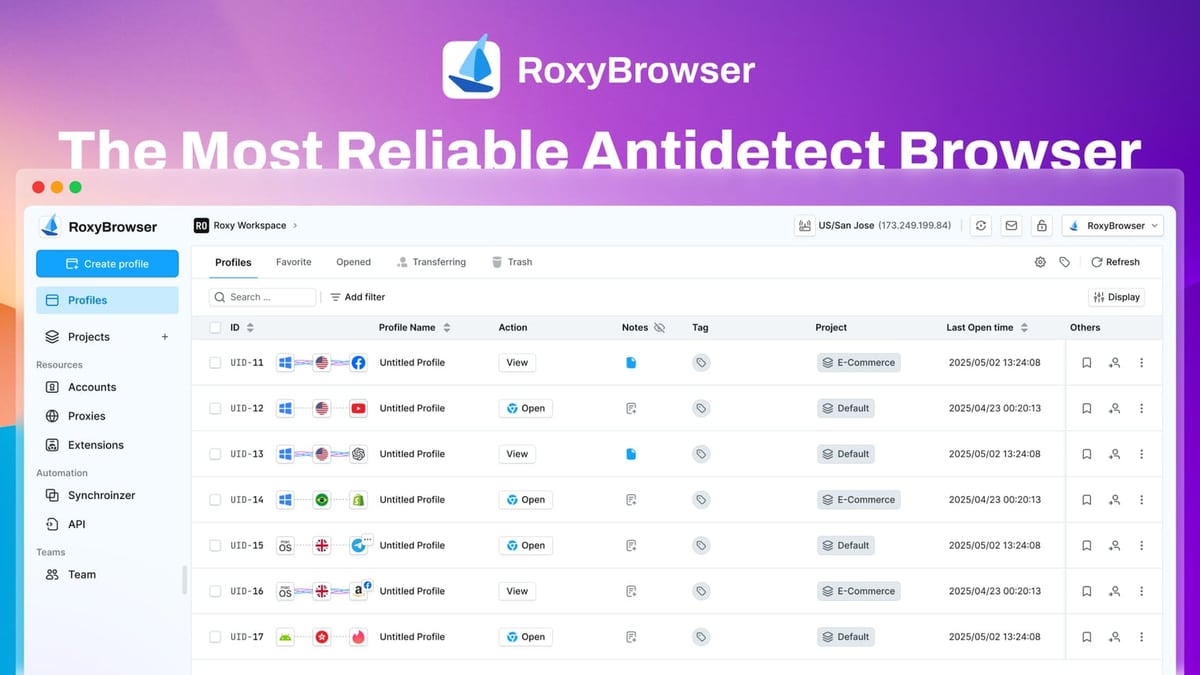
DuoPlus Cloud Phone vs Kameleo vs RoxyBrowser: Which Wins? product interface and feature overview.
RoxyBrowser puts its proxy ecosystem at the centre of anti‑detection. It’s tightly integrated with RoxyIP, but you can bring your own proxies too. Key highlights:
- One‑click profile + proxy creation—no copy‑pasting of IP addresses.
- Advanced fingerprint isolation for each browser profile, covering WebGL, canvas, fonts, timezone, and more.
- Automation support for Puppeteer, Selenium, and Playwright, plus bulk profile actions for large‑scale operations.
- Workspaces for team collaboration: you can invite members, assign granular permissions, and manage hundreds of profiles together.
- Lightweight desktop client for Windows and macOS, with a free‑forever plan and a 7‑day trial.
RoxyBrowser is a solid choice for marketing agencies, SEO specialists, and affiliate managers who need to verify ads, perform unbiased SERP analysis, or run multiple e‑commerce seller accounts from the desktop. It’s less intimidating than Kameleo, but still rooted in desktop browsing—there’s no real mobile operating system underneath.
DuoPlus Cloud Phone at a Glance: Real Mobile Environment for Social Media & Crypto

DuoPlus Cloud Phone vs Kameleo vs RoxyBrowser: Which Wins? product interface and feature overview.
DuoPlus Cloud Phone takes a fundamentally different route. Instead of emulating a mobile browser, it provides a complete Android 15 environment on real ARM chips. Each cloud phone comes with:
- Unique device fingerprints at the hardware level (IMEI, MAC address, serial number)—not just browser‑level signals.
- Dedicated IPs with global GPS and SIM simulation. The SIM carrier, timezone, and locale are automatically matched to the IP, a feature often lacking in antidetect browsers.
- One‑click skin changing that lets you swap the entire device identity instantly.
- Unlimited multi‑instance operations so you can run dozens of TikTok, Instagram, Facebook, YouTube, WhatsApp, Telegram, or crypto airdrop accounts in separate, isolated Android environments.
- AI Agent for no‑code mobile automation—scripts that like, follow, and post without writing code, ideal for social media growth.
- Team sharing: you can assign different cloud phones to team members, all managed from a central dashboard.
- Accessible from any PC or mobile browser, no client download needed. This reduces hardware costs and lets you work from anywhere.
DuoPlus also offers cloud numbers for SMS verification and integrates with tools like UiPath and IP2Location for advanced workflows. For teams whose bread and butter is mobile‑first platforms, the gap between cloud phone and desktop browser becomes glaring.
Head‑to‑Head on Key Criteria
We’ll compare the tools across the areas where DuoPlus Cloud Phone brings a distinct advantage, while acknowledging where the browsers excel.
1. Mobile Environment Authenticity
DuoPlus Cloud Phone runs genuine Android 15 on ARM architecture, passing Google Play Integrity checks that desktop browsers can’t fake. Each instance has its own storage, SIM card region, and GPS location. Apps like TikTok or Instagram that probe for root detection or a real device profile see exactly what they expect.
Kameleo emulates mobile browsers, and its fingerprints can look like Chrome on a Samsung phone, but the environment is still a desktop operating system. Many mobile‑specific checks (e.g., sensor data, real‑time battery status, app‑level certificate pinning) remain impossible to replicate perfectly.
RoxyBrowser offers no mobile operating system at all; it’s a desktop browser with fingerprint isolation. That’s fine for desktop‑oriented sites, but risky for accounts that must appear on a mobile device.
Verdict: For mobile‑heavy social media, fintech apps, or crypto platforms that demand a genuine Android handset, DuoPlus’s cloud phones are the only option that doesn’t cut corners.
2. Automation Approach
DuoPlus Cloud Phone includes an AI Agent that automates repetitive mobile tasks without coding—warming up TikTok accounts, batch posting, liking, and message replies. It also supports ADB integration for custom automation with UiPath or similar RPA platforms, making it friendly for both non‑technical marketers and advanced automation builders who need real mobile endpoints.
Kameleo is the heavyweight for desktop automation. Its SDKs work with Playwright, Puppeteer, and Selenium, letting you scrape JavaScript‑heavy sites, bypass Cloudflare, and control thousands of browser instances via Docker. This is perfect for web data extraction and form‑filling at scale, but it’s a developer‑first world.
RoxyBrowser also supports Puppeteer, Selenium, and Playwright, and offers bulk actions for profile management. It’s well‑suited for ad verification, SERP tracking, and automated affiliate campaigns from a desktop browser.
Verdict: If your automation lives inside mobile apps (social media growth, crypto airdrop claiming), DuoPlus’s AI Agent and ADB access give you a head start. For massive web scraping or browser‑based RPA, Kameleo and RoxyBrowser are the better workhorses—and you’ll likely want to explore [top web scraping and automation platforms](https://DuoPlus Cloud Phone.com/top-10-web-scraping-automation-platforms-2026) for additional context.
3. Fingerprinting & Anti‑Detection Depth
DuoPlus Cloud Phone provides device‑level isolation: each cloud phone has unique hardware identifiers (IMEI, MAC) and a unique IP address. Because it’s a full Android stack, no browser fingerprint manipulation is needed; the device simply presents its natural fingerprint. This makes it extremely hard for platforms to link accounts.
Kameleo offers surgical fingerprint customization. You can tweak virtually every browser parameter and even load custom Canvas/WebGL spoofing scripts. Its mobile emulation creates composite fingerprints that often pass Pixelscan and IPHey, but inconsistencies can still flag on advanced mobile‑specific probes.
RoxyBrowser emphasises isolated browser fingerprints and tight proxy matching, achieving reliable anonymity for desktop websites. It does not attempt to simulate a mobile OS.
Verdict: For mobile accounts where a real device matters, DuoPlus’s natural fingerprint wins. For desktop anonymity with maximum tweaking flexibility, Kameleo is the enthusiast’s choice.
4. Team Collaboration
DuoPlus Cloud Phone lets you share individual cloud phones with team members, making it straightforward for an agency to assign specific phones to different operators. A central dashboard monitors all instances.
RoxyBrowser shines with its Workspaces feature—invite members, set permissions, and manage profile folders across a whole team. It’s a smart setup for marketing teams that live inside desktop browsers.
Kameleo is the most limited: profiles are stored locally, and collaboration involves manual export/import. The license is tied to one computer, so true team use is clunky.
Verdict: For agencies managing mobile social accounts, DuoPlus’s team sharing is a natural fit. For desktop‑oriented teams, RoxyBrowser’s Workspaces offer dedicated multi‑user management.
5. Ease of Access & Deployment
DuoPlus Cloud Phone runs entirely in the cloud. You log in through any modern browser (PC or phone), launch a cloud phone, and start working. No client installation, no local resource drain, and you can switch devices seamlessly.
Kameleo has a steep learning curve. You install a local desktop app, manually configure fingerprints and proxies, and the Android mobile app (if you buy the higher plan) must be tethered to the desktop. Not for the faint of heart.
RoxyBrowser is easier: a clean desktop client, one‑click proxy creation, and a free trial. Setup is quicker, but you’re still restricted to the computer where it’s installed.
Verdict: If you need instant access from any machine, zero hardware dependency, and a gentle onboarding, DuoPlus’s browser‑based model is the clear winner.
When to Choose Each Tool
Choose DuoPlus Cloud Phone when:
- Your accounts live on TikTok, Instagram, Facebook, Tinder, WhatsApp, or crypto dApps where a real mobile presence is non‑negotiable.
- You want a no‑code mobile automation assistant to warm up and grow accounts.
- Your team needs to share cloud phones without buying physical devices.
- You care about GPS/SIM simulation and dedicated IPs that match the device’s locale.
For a closer look at how DuoPlus stacks up against another popular cloud phone, read our [GeeLark review](https://DuoPlus Cloud Phone.com/geelark-review).
Choose Kameleo when:
- You’re a developer automating browser tasks with Playwright or Puppeteer.
- You need unlimited local browser profiles and the ability to craft fingerprints from scratch.
- You work on desktop‑oriented platforms and web scraping is your main revenue driver.
Choose RoxyBrowser when:
- You want a lightweight antidetect browser that ties seamlessly into RoxyIP proxies.
- Your team needs collaborative workspaces and affordable plans.
- Your tasks—SEO checking, ad verification, multi‑store e‑commerce—stay primarily on desktop websites.
If you’re specifically weighing DuoPlus against RoxyBrowser, we’ve written a [dedicated cloud phone vs antidetect browser breakdown](https://DuoPlus Cloud Phone.com/duoplus-cloud-phone-vs-roxybrowser).
Related reading
- DuoPlus vs Hippo Cloud Phone (Blue Elf Cloud Phone): Anti-Detect Showdown - Compare DuoPlus Cloud Phone and Hippo Cloud Phone (Blue Elf Cloud Phone) for multi-account management. Discover which anti-detection cloud phone offers better security, automation, and scalability.
- GeeLark Review 2026: Cloud Phones, Pricing & Honest Test - Honest GeeLark review covering cloud phones, anti-detect profiles, automation, real pricing, and whether it’s worth the cost for multi-account mobile marketing.
- Top 10 Enterprise Automation & AI Orchestration Platforms 2026 - Discover the 10 best enterprise automation and AI orchestration platforms of 2026. Compare features, governance, and scalability for agentic AI, RPA, and workflow orchestration at scale.
Sources and further reading
- Best 7 Antidetect Cloud Phone Tools for Multi-account in 2026: Detailed Guide - We compare and list 7 best android cloud phone tools in 2026 and share their honest review, performance so you can pick the best one. VMOS Cloud, GeeLark, MultiLogin, DuoPlus, BitCloudPhone, MoreLogin, and UgPhone included.
- Kameleo Browser Alternative: Updated 2025 Review - Using or considering Kameleo for business? It might be time to reconsider! Here's a 2025 review with features, running costs and comparison table.
- Che Browser vs Gologin: Honest Review 2026 - Anti-detect browsers frequently advertise as solutions to unreasonable limitations set by tech companies that pull all the digital strings. The one we'll be
FAQ
Is a cloud phone safer than an antidetect browser for multi‑account management?
It depends on the platform. For mobile‑first apps that aggressively check for real device indicators (TikTok, Instagram, crypto wallets), a cloud phone like DuoPlus provides a genuine Android environment that antidetect browsers can’t fully replicate. For desktop websites, a well‑configured antidetect browser like Kameleo or RoxyBrowser can be equally safe.
Can I run Kameleo or RoxyBrowser on a mobile phone?
Kameleo has an Android app, but it requires the desktop application to work and is only available on higher‑tier plans—it’s not a standalone mobile solution. RoxyBrowser is a desktop browser only. DuoPlus Cloud Phone, on the other hand, is accessible from any mobile browser, so you can control cloud phones from your smartphone.
Which tool supports the best automation for non‑coders?
DuoPlus’s AI Agent is built for marketers who don’t code. It automates likes, posts, follows, and account actions inside the Android cloud phone. Kameleo and RoxyBrowser both require scripting skills to unlock their automation power.
Do I need to buy a proxy separately with DuoPlus Cloud Phone?
DuoPlus provides dedicated IPs out of the box, with GPS and SIM data already aligned to the IP location. In contrast, Kameleo and RoxyBrowser require external proxies (Kameleo has none built‑in; RoxyBrowser integrates with RoxyIP). This simplifies setup and reduces cost.
The Bottom Line
Choosing between a cloud phone and an antidetect browser isn’t about picking the “best” tool—it’s about the environment your accounts need to survive and grow. DuoPlus Cloud Phone offers true mobile authenticity, dedicated IPs, and an AI‑powered automation layer that feels purpose‑built for social media marketers and crypto multi‑accounters. Kameleo hands the keys to developers who want uncompromising control over browser fingerprints for web scraping. RoxyBrowser delivers a polished, proxy‑friendly desktop experience for teams managing web‑based identities.
Whichever route you pick, align the tool with your platform first—then add automation, team features, and budget to seal the deal.